Making an Expanding Code Box
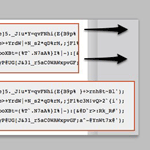
On blogs that like to share snippets of code like this one, it is common to use the <pre> tag to wrap the code so that the spacing/indenting is maintained and long lines do not wrap. While this is desirable behavior, it can be undesirable to have those un-wrapped lines break out of their containers awkwardly and overlap other content.
Here at Digging Into WordPress, we use JavaScript (jQuery) to solve this problem. One solution could potentially be to use only CSS and expand the width with something like pre:hover, but JavaScript is more elegant for various reasons:
- Expands only when needed
- Expands only to as wide as needed
- Expands with animation
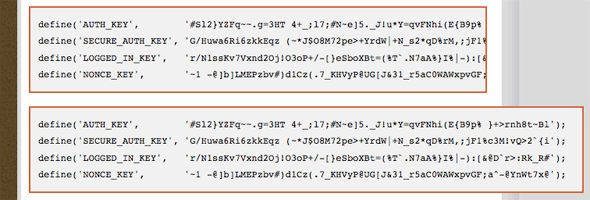 Example of the expanding code box we’re building in this tutorial
The CSS
The <pre> tag is naturally block-level, so this is what we’ll use to style our code blocks and hide the overflow.
pre {
  background: #eee;
  padding: 10px;
  border: 2px solid #c94a29;
  overflow: hidden;
  margin: 0 0 15px 0;
  width: 563px;
  font-family: Courier, Monospace;
}
The jQuery
The real trick here is that the code blocks are wrapped not only in <pre> tags but also in <code> tags. The code may ultimately get cut off by the pre block, but that inner code tag still has a natural width that can be measured by JavaScript. Here is the logic:
- When a pre block is hovered…
- Measure the internal code blocks width
- If that width is wider than the pre block…
- Expand the pre block to be wide enough to accommodate
- On mouseOut, return the pre block to its original size
$j("pre").hover(function() {
	var codeInnerWidth = $j("code", this).width() + 10;
    if (codeInnerWidth > 563) {
		$j(this)
			.stop(true, false)
			.css({
				zIndex: "100",
				position: "relative"
			})
			.animate({
				width: codeInnerWidth + "px"
			});
		}
	}, function() {
			$j(this).stop(true, false).animate({
				width: 563
		});
	});
Couple of things of note here. The codeInnerWidth is calculated on every hover, because different blocks will have different inner widths. The width of the pre blocks are hard-coded though. Calculating that on every hover leads to problems like fast mouse-in-mouse-outs expanding the box and re-calculating it’s size to be larger than it was originally. The stop function prevents queuing up of animations. Also note the $j being used is just because we are using jQuery in noConflict mode:
var $j = jQuery.noConflict(); Demo
None of the code blocks so far in this tutorial have been long enough for you to see the expanding code box in action, so here is a demo block of code (RSS readers, obviously you need to view this on our site to see it work).
This is a really long line of code that is even longer than the world super-cala-frag-alistic-espee-ala-dosisEditor’s note: expanding code boxes not available in the current theme.
About the author

Chris Coyier is a real-world web designer who has been reaching for WordPress to power client sites for many years. He subscribes to the theory that not only is WordPress capable of powering any website it is almost always the right choice. His other projects include CodePen and Quotes on Design.





17 responses
-
 Benjie
I check your CSS tricks site Chris…It’s pagerank is still 6
-
Benjie
Actually this is a nice trick you have here on DiW… I also like the sidebar which slides to the right when you hover on it. It’s also jQuery right?
-
 Tim Gieseking
I don’t know about this site specifically (didn’t look at the source) but it can be done using jQuery’s .animate pretty simply.
-
-
This is awesome — I am thinking about using it at Perishable Press. Thanks for posting in tutorial format.
-
 Dave Blencowe
I have recently been playing with jQuery and have considered using it for the pre/code tags on my site. I like the idea you have implemented here and might use something similar for my site, although I would prefer to use an expand button I think.
-
 Frank
FrankHmm, I prefer the scrollbar. This’ll be annoying if you got a lot of code on one line, you’ll have to scroll to the right and keep your mouse on the code, but I guess it works good with a little bit of code.
-
 Chris Reynolds
Very nice little effect!
-
 Jeff Mackey
Awesome! Thanks for the explanation. Again, nicely done!
-
It’s nice. But I just want to point out a problem(?). I visited this site with a pretty small screen and when the code expanded a horizontal scroll was needed. That’s fine. But it gets a bit tricky when one tries to copy the code inside the block. I guess this could be solved by having a neat little “copy-this-code”-button though.
Well anyway thanks for sharing!
-
Sorry, I know it’s not really adding to the conversation, but this is really cool. Thanks for sharing.
-
 Matthew Muro
Personally, I like using the built-in WordPress shortcode [sourcecode language=’whatever’]. You get a scroll bar and code highlighting.
-
I thought that was only for WordPress.com accounts.. is that functionality also built into self-hosted installations?
-
Matthew Muro
Jeff, you’re right. I guess it would help to compare my self-install to the WordPress.com blog before hitting submit.
WordPress.com just uses the SyntaxHighlighter plug-in globally (or at least, it’s based off this code).
-
-
-
In your demo, s/world/word/ig.
-
 Kim Steinhaug
The copy problem is realy not a problem and is easilly solved. Include an extra empty line infront of the code and after the code. This way you place the mouse pointer above the line you need, keep the left mouse pressed and drag down passed the line you need included in the copy. Pretty basic copy behaviour, however you need the extra lines unless you drag outside the box to get the same effect.
vertical scrollbar is never nice, however wordwrap with code is worse! Nice function, will definately include this behaviour on my own blog when I get the time.
-
Really interesting pieces of code. Thanks !
-
 Vincent
I think it’s better to set the overflow via jQuery, so without JavaScript you can also read the Code.