WordPress Post Navigation Redux (New Tags!)
For years WordPress post navigation has been possible thanks to a flexible set of five functions, including posts_nav_link(), next_post_link() and next_posts_link(). These navigational functions continue to work great in many WordPress themes, but there are newer, even more flexible functions available to theme developers. Introduced in WordPress 4, these new navigation functions can make it easier than ever to display nav links for your WordPress-powered posts.
Theme Switcha
Just launched my latest WordPress plugin, Theme Switcha — theme siwtching done right. It enables you to develop, test, and preview themes without your visitors knowing. Lots of great features and super flexible. 100% free :)
Stop Ruining the WordPress Admin Area
I guess what I was trying to get at with my previous poll about too many plugins was the idea that a lot of WordPress sites that I see these days are just absolutely trashed in the Admin Area due to inconsiderate, poorly planned plugins and themes. For users, a few wrong turns when choosing plugins can leave the streamlined, easy-to-use Admin Area an absolute mess of annoying ads and discordant design. So this DigWP post is encouragement for plugin and theme developers to please STOP ruining the WordPress experience with aggressive marketing tactics, endless nagging, and other obtrusive nonsense.
Lynda.com Video Course: Developing Secure WP Sites
Launch! Lynda.com just released my new course, WordPress: Developing Secure Sites, featuring over 30 video tutorials. The course is jam-packed with 10+ years worth of frontline WordPress experience, and is loaded with tips, tricks, and techniques for keeping your WordPress site safe and secure.
DigWP Book Update – WP 4.6!
Digging Into WordPress is updated for WordPress version 4.6. The new version is a FREE download for everyone who owns the book. This is the the book’s 19th update! Log in to the Members Area to download the latest version, or if you don’t own the book you can get it here.
How to Remove Items from the WordPress Toolbar
The WordPress Toolbar makes it easy for plugin and theme developers to add links and other items. This is great news if you find the added links useful; otherwise, the additional links may be more of a nuisance, cluttering up your current workflow. For example, the database-backup plugin UpdraftPlus adds an “UpdraftPlus” link. Some users probably think this is awesome, but for my own sites it’s just not necessary, and is something I would like to remove. So for this DigWP tutorial, we’ll use the UpdraftPlus Toolbar link to demonstrate how to remove unwanted items from the WordPress Toolbar in general.
Complete Guide to WordPress Admin Notices
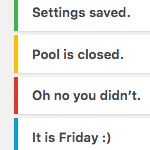
As you work in the WordPress Admin Area, you’ll undoubtedly encounter “admin notices” that let you know about errors, updated settings, required actions, and so forth. Most default admin notices are provided by WordPress out of the box, but it’s up to plugins and themes to provide any custom notices that may be required. This DigWP tutorial digs deep into WordPress admin notices and explains how to implement, customize, and everything in between.
DigWP Book Update!
Digging Into WordPress is updated for WordPress version 4.5. The new version is a FREE download for everyone who owns the book. This is the the book’s 18th update, which means that some people have received 17 free updates over the past 5 years! Log in to the Members Area to download the latest version, or if you don’t own the book you can get it here.

DIY WordPress Popular Posts
Over at my code snippets site, I keep track of the most popular posts and display a list in the sidebar. It’s an easy way to highlight the site’s best content and share top snippets with visitors. There are numerous plugins available for displaying your site’s popular posts, but they tend to be overkill and/or employ weird algorithms that are just unnecessary and not always accurate.
For example, a lot of plugins and techniques calculate popular posts based on number of comments. These days I’m just not sure if that’s a relevant measure of popularity. Some sites have comments disabled, and other sites receive very few comments in general, so going the comment-count route just doesn’t work.
What I wanted was a simple way of counting hits and displaying a simple list of the most popular posts. This DigWP tutorial explains how to do it with two easy steps. Sound good? Let’s dig in..
Dashboard Widgets Suite
Just launched my latest WordPress plugin, Dashboard Widgets Suite. It provides a bunch of awesome Dashboard widgets that I use on my own sites. Widgets include User Notes, Debug Log, System Info, Social Media, RSS Feeds, Custom Menu, and even a widget to display any other widget, right on your WordPress Dashboard.
Disable Open Sans Google Font on Frontend
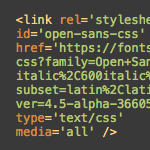
Working on the 2020 theme for my book, WordPress Themes In Depth, I noticed that WordPress was including a stylesheet from the Google API. Closer examination revealed that the styles were adding the Open Sans font via Google Fonts. The font itself is great, but I could not figure out where/how/why it was being added to the markup. This quick post explains what was happening and how to disable it.
Blackhole for Bad Bots
I converted my Blackhole Spider Trap into a FREE WordPress plugin. It’s fun, easy, and a great way to protect your site against rogue bots. Grab it at the WordPress Plugin Directory.

How to Include Styles in WordPress Child Themes
This DigWP tutorial explains the “new” way to include parent stylesheets in Child Themes. I put the word “new” in quotes because the technique actually has been around for years, but there are many developers and designers who still use the old @import way of adding parent styles. This tutorial is for people who may be unfamiliar with using WordPress’ enqueue functionality for Child Themes.
Here you’ll find copy-n-paste techniques, examples, caveats, and numerous resources. Basically everything you need to know about including styles in your Child Themes. Let’s dig in..
Digging Into WordPress Version 4.4
New version of Digging Into WordPress now available! The update is current with WordPress version 4.4, and is a FREE download for everyone who owns the book.