Which Template File does WordPress Use to Render Different Pages?
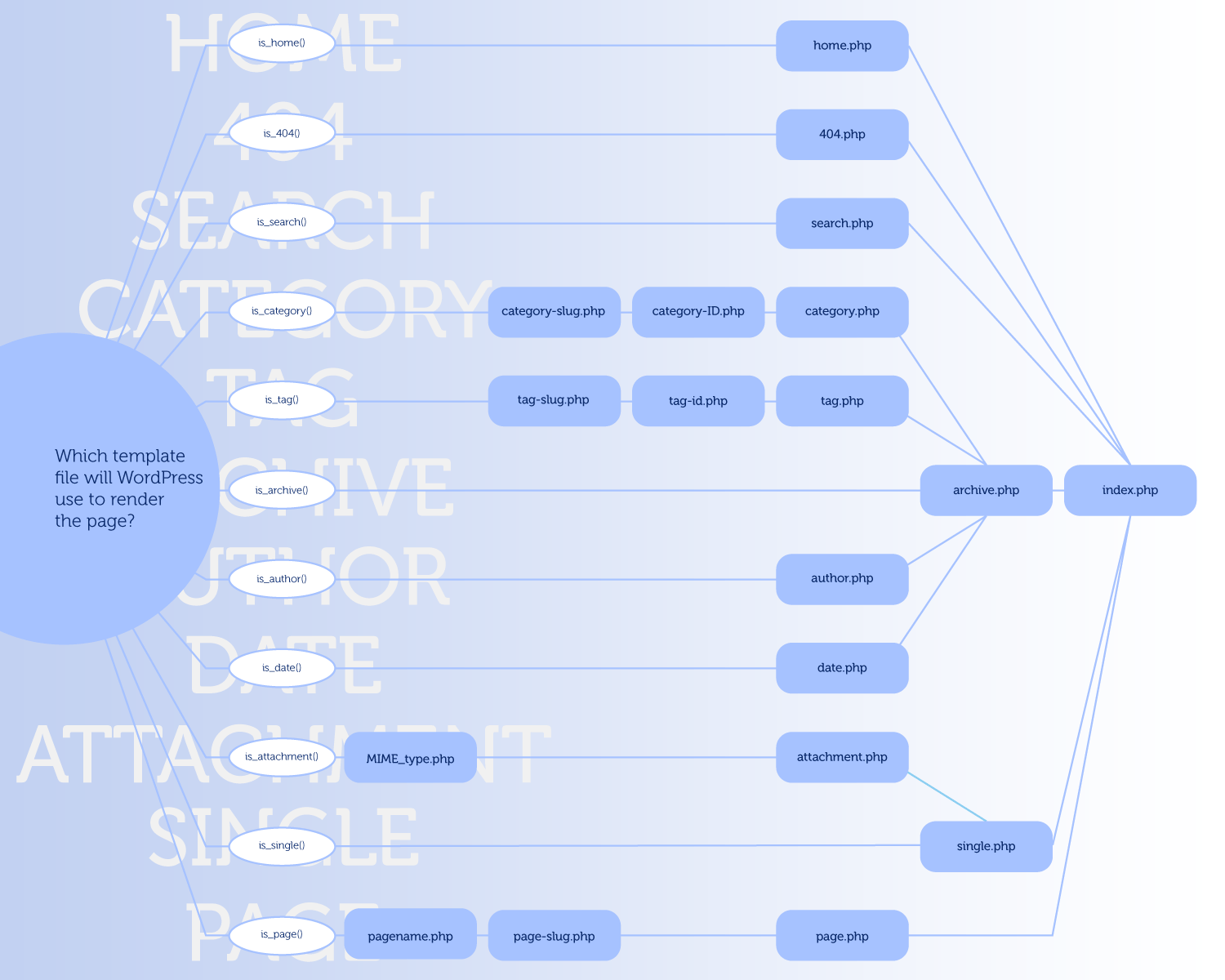
This page in the codex has a particularly interesting infographic that shows a flowchart of how WordPress chooses which template file it is going to use to render the page. For example, did you know if you have a published page with “contact” as the slug, it will look for and use page-contact.php automatically?
Unfortunately this graphic wasn’t very pretty and for some reason has a giant “Page 1” text awkward sitting over it. We have an outdated version of this in the book, and since we are updating it right now, I thought I would take the opportunity to re-create this chart.
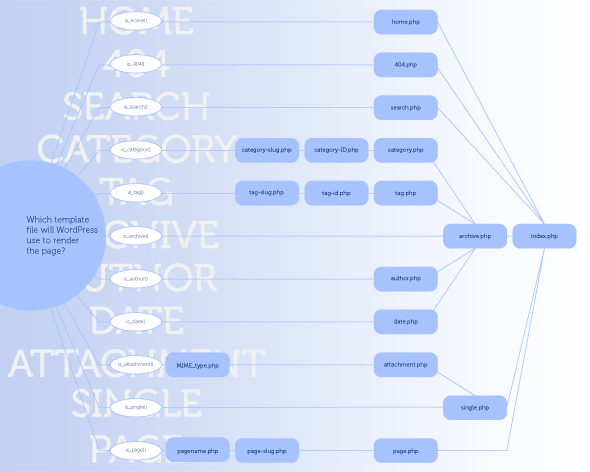
This will also be used in the book, which should be back available for order in around a week or so! Stay tuned!
About the author

Chris Coyier is a real-world web designer who has been reaching for WordPress to power client sites for many years. He subscribes to the theory that not only is WordPress capable of powering any website it is almost always the right choice. His other projects include CodePen and Quotes on Design.





11 responses
-
I thought there were more stuff with authors, a bit like tags or categories ?
-
 Chris Coyier Post Author
There may be… I just redrew the chart available. If there is, I’d love to hear about it and update this.
-
Indeed there are
author-{$author}.phpandauthor-{$author_id}.php(seeget_author_template()inwp-includes/theme.php)Basically I think everything you can think of just works now :)
-
Chris Coyier Post Author
I’m also hearing this will be out of date for v3.0, so will definitely need an update.
-
-
-
 Matthew Simo
I’m interested in where custom taxonomies and the 3.0 custom post-types will fit in.. Any happen to know off hand?
-
 Lane Lester
It may not be perfect, but I really appreciate your sharing this. I’m not an expert at editing theme files, and this will help.
-
In WP 3.0 I’m using
single-contact.phpfor a custom post type “contact”.Thanks for the redesign, this is much easier on the eyes than the Codex’s version.
-
 Duncan
Glad to hear its in the book and that the book will be back on sale soon. Looking forward to getting my mitts on it! :)
-
you forgot the
PAGE-{ID}.php.-
 RJ McCollam
That’s what I thought at first too, but it looks like he just called it page-slug.php.
-
SEE
-
-